Course Info
Official course outline. See home page for many details like contact info and office hours.
Flipped Classroom and Flexibility
My goal is to maximize student engagement, learning, and enjoyment.
- Flipped Classroom
- Starting 2nd week: course content (slides) will be presented in pre-recorded videos. Students are expected to watch the videos before the lecture it is used in.
- Lectures will be used for live, in-person explanation and teaching with examples.
- All pre-recorded videos and live lectures are testable on exams.
- TA office hours are a mix between in the lab, and online via Discord.
- Instructor is available after class (~10 min) for in-person questions and during office hours.
- Assignments have a flexible late policy based on lecture attendance.
- Students asking for an academic concession must email Dr. Brian and may be asked to submit SFU Academic Concession Self-Declaration Form
Getting Extra Help
There are many great ways to get extra help!
- Discord Chat
Connect with classmates, instructor, and TAs using Discord. Channels are setup for talking to course staff, asking questions, and chatting with fellow students. Note: Discord is hosted outside of Canada; you can sign-up under an expendable email account; it is not mandatory to use -- emailing Dr. Brian is always an option. - Office Hours
The instructor has weekly in-person office hours; please come by and say hello! TAs have many online office hours. Office hours are great for getting one-on-one help or discussing personal concerns. Also, seeing TAs in-person during lab times can be very effective. Online office hours held using Discord. If you object to using Discord, email/zoom are also options as needed. - Peer Tutoring Drop-in CS Peer Tutoring available online or in-person. Get help from your fellow students who have already taken the course! They can help you identify and tackle your challenges in the courses. Come early to stay ahead of the curve. See your peer tutors' office hours on the website
- Email Less efficient than Discord, but private. Good for private questions about grades or extension requests. Please include course number in the email's subject line.
Use of Generative AI Tools
Large Language Models (LLMs) such as ChatGPT, Copilot and Claude are very powerful for assisting programmers. They can help us by:
- Support us learning course material.
- Provide feedback on what some code does.
- Helping to find bugs.
However, they also make it really easy to not learn! This is the primary risk of using GenAI as a student: it can make taking a course a complete waste of your time.
To be a good software developer you need to know how to read and write the code yourself (with and without the AI tools). The quizzes associated with each assignment (details below) will test that you have learned the fundamental skills of each assignment and can apply those skills without the use of AI.
For this course, here are the AI rules:
- You may use any AI tool to help you understand code.
- You may not use AI tools to help you write code unless explicitly told otherwise for that specific activity. This includes AI autocomplete using Copilot, AI chat sessions like Claude/ChatGPT, or agentic coding tools like Claude Code or ChatGPT Codex.
- Using an AI tool to write your code for labs or assignments is academic dishonesty.
- No computer, cell phones, smart devices (smart watches, smart glasses, smart rings, ...) or AI tools are permitted on the quizzes, midterm or final exam (worth 90% collectively). We give grades for what you have learned, not what your AI tool can do for you.
Grading
All submissions done via CourSys. Also shows you your marks and marking feedback; look for the magnifying glass icon for detailed feedback.
- Midterm (25%) - In-person on-paper exam.
- Final Exam (35%) - Cumulative for course; in-person on-paper exam.
- Labs (10%) - Weekly lab exercise; see below for details.
- Quizzes & Assignments (30%) - 4 assignments and a project (a big assignment); due about every 2 weeks.
- Assignments and the project are marked as follows:
- You submit your assignment and it is marked by the TA. This is your "assignment mark".
- You later write a short in-class (hand-written) quiz related to the assignment. This is your "quiz mark".
- Only the quiz mark has a weight in the course's grade overall.
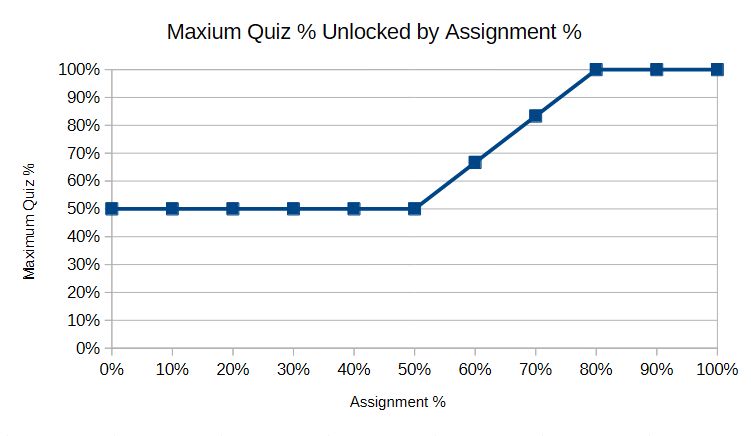
- The starting maximum grade you can get on a quiz is 50%. Your score on the related assignment unlocks a higher possible maximum mark on the quiz as follows:
- Assignment score of 0% to 50%: leaves the maximum quiz grade at 50%.
- Assignment score between 50% and 80% smoothly interpolates between the maximum scores of 50% and 100%, such as:
- Assignment score of 60%: unlocks a maximum quiz grade of 66.7%.
- Assignment score of 70%: unlocks a maximum quiz grade of 83.3%.
- Assignment score of 80% (or higher): unlocks a maximum quiz grade of 100%.
- Rationale: Doing assignments teaches you the course content, but doing the quiz tests that you know the content. You can earn up to 50% of the quiz marks even you did not complete the assignment, and getting 80% on the assignment is enough to unlock full credit for your quiz.
- Some examples:
- If Xia earned 95% on the assignment and then scored 70% on the quiz:
Their score would be 70% in the end because their assignment score unlocked a maximum grade of 100% but their actual quiz score was less than that maximum. - If Yasmin earned 60% on the assignment and then scored 90% on the quiz: Their score would be 66.7% in the end because their low assignment score only unlocked a maximum of 66.7% on the quiz.
- If Ricardo did not turn in the assignment but still scored 100% on the quiz:
Their score would be 50% in the end because everyone unlocks at least 50% maximum on the quiz.
- If Xia earned 95% on the assignment and then scored 70% on the quiz:
- The figure below shows the maximum grade a student can earn on a quiz based on their assignment score.
- Assignments and the project are marked as follows:
Grading Details
- Students must attain an overall passing grade on the weighted average of exams in the course in order to get a D or higher.
- If a student earns a "pass" (usually 50% or more) on the weighted average of the final and midterm, then the student gets whatever grade they have otherwise earned in the course.
- If a student does not earn a pass on the weighted average of the midterm and final, then the student will get an F in the class.
- This policy ensures that students are able to demonstrate they are proficient with the course content in an exam setting in order to pass. This is a Computing Science departmental policy that helps ensure everyone can independently demonstrate their knowledge.
- The MOSS tool will be used to check the originality of all electronic submissions (within this class, and against previous offerings as needed).
- SFU's Student Academic Integrity Policy is crucial to earning credit in this course. Violations of the policy will be taken seriously and reported to the department and university.
- Explanation of penalties I often apply for academic dishonesty.
Late Policy
- Assignment Late Policy
There is a 60 minute grace period on due dates to accommodate unexpected submission issues. You can earn late days by attending lecture: each lecture earns 6 hours of late time. Late submissions will use these earned late days. You may use up to 3.0 late days per assignment; this will be done automatically. Late assignments for students who do not have enough earned-late-days will receive a mark of 0.- For a given assignment, lectures up to and including its due date count for earning late days that can be used towards that assignment.
- Unused late-days earned earlier in the semester carry forward until used.
- See Canvas for how many late days were used on each assignment.
- Lab Late Policy
Each student is allowed to request one lab submission (only one lab) during the semester to be accepted up to 48h late. This is expected to be used to handle cases of submission errors, forgetting to submit, or other related cases. To redeem your one-free-late-lab submission, please submit your lab to CourSys, and then email TA Alex rgc4@sfu.ca and state:- That you'd like to redeem your one-free-late-lab.
- What lab number (like Lab 2).
- What is your SFU username (like
bfraser).
- Extensions and Deferrals
Email Dr. Brian with your request. You may need to complete and email SFU Academic Concession Self-Declaration Form. Doctor's notes are usually not required.
Mandatory Weekly Labs
Labs will help you get working with the programming concepts introduced in lecture. In this class the words "lab" and "tutorial" are used interchangeably.
- Weekly labs start during the 2nd week; you do not need to attend your lab section during the first week. The TAs will not be there during the first week.
- Half of the credit for labs will be for attendance; you must attend a lab section and be recorded as present by the TA to get the marks. You do not need to complete the lab to get this mark, but you do need to be focused during the lab!
- In the lab, you can use your own computer or the lab computer.
- You may show a TA your completed lab at the start of any lab section to get credit for attending (useful if you are unable to stay for the full period).
- Half of the credit for labs will be for completion (not correctness). You must submit your completed lab solution to CourSys by the due date and have completed at least 80% of the lab to earn these marks. If you don't complete your lab exercise during your lab time, you must complete it on your own later (either on the lab computers or on your own computer).
- You can complete the lab working with other students (recommended!) to get and give help, plus build social connections.
- You must have typed the solution yourself to get the marks. It is academic dishonesty to copy the file of another student, or to have GenAI create the solution. You may get or give help to/from anyone, and may ask GenAI for help understanding the content or explaining any issues; however, you must be learning from this interaction not just generating a solution.
Good Textbooks (NOT REQUIRED)
- How to think like a Computer Scientist - C++ Edition
Contains sample questions. - Problem Solving with C++, 10th ed., Walter Savitch, Addison-Wesley, 2018, 9780134448282, Earlier editions OK; eBook versions may be significantly cheaper;
- Starting Out with C++ From Control Structures to Objects 9th Edition, Tony Gaddis, Pearson Education, 9780134498379
- Programming, Principles and Practice Using C++, Bjarne Stroustrup, Addison-Wesley, 2014, 9780321992789
- How to think like a Computer Scientist - C++ Edition